- LiveKit
- WebRTC
- Self-hosting
- Docker
How to self-host LiveKit for live classes: lessons from 24 recordings on one server
How we self-host LiveKit for live classes: the ports that break first, room timeouts, four egress workers, the bug that looked like a capacity problem, and our load test.

· 5 min read
Key takeaways
- 1A self-hosted LiveKit setup needs more than the server: Redis, a reverse proxy with HTTPS, TURN, egress workers for recording, and your own API.
- 2Publishing LiveKit's 1,501-port UDP range from Docker requires turning off the userland proxy, or one proxy process per port eats the host's memory.
- 3Each egress worker needs its own temp folder; a shared one makes workers delete each other's IPC sockets and recordings fail at start.
- 4On an 80-core server, 24 concurrent recordings used about half the CPU; 30 worked but left no headroom, so 24 is the cap.
You can self-host LiveKit on a single server and run real live classes on it. We do: one machine runs the LiveKit server, Redis, four recording workers and TURN for the live classes of Schoolaris and the CCL platforms. In a load test in May 2026 it recorded 24 classes at once with every file intact. This is the setup, and the mistakes that taught me each part of it.
What you need to self-host LiveKit#
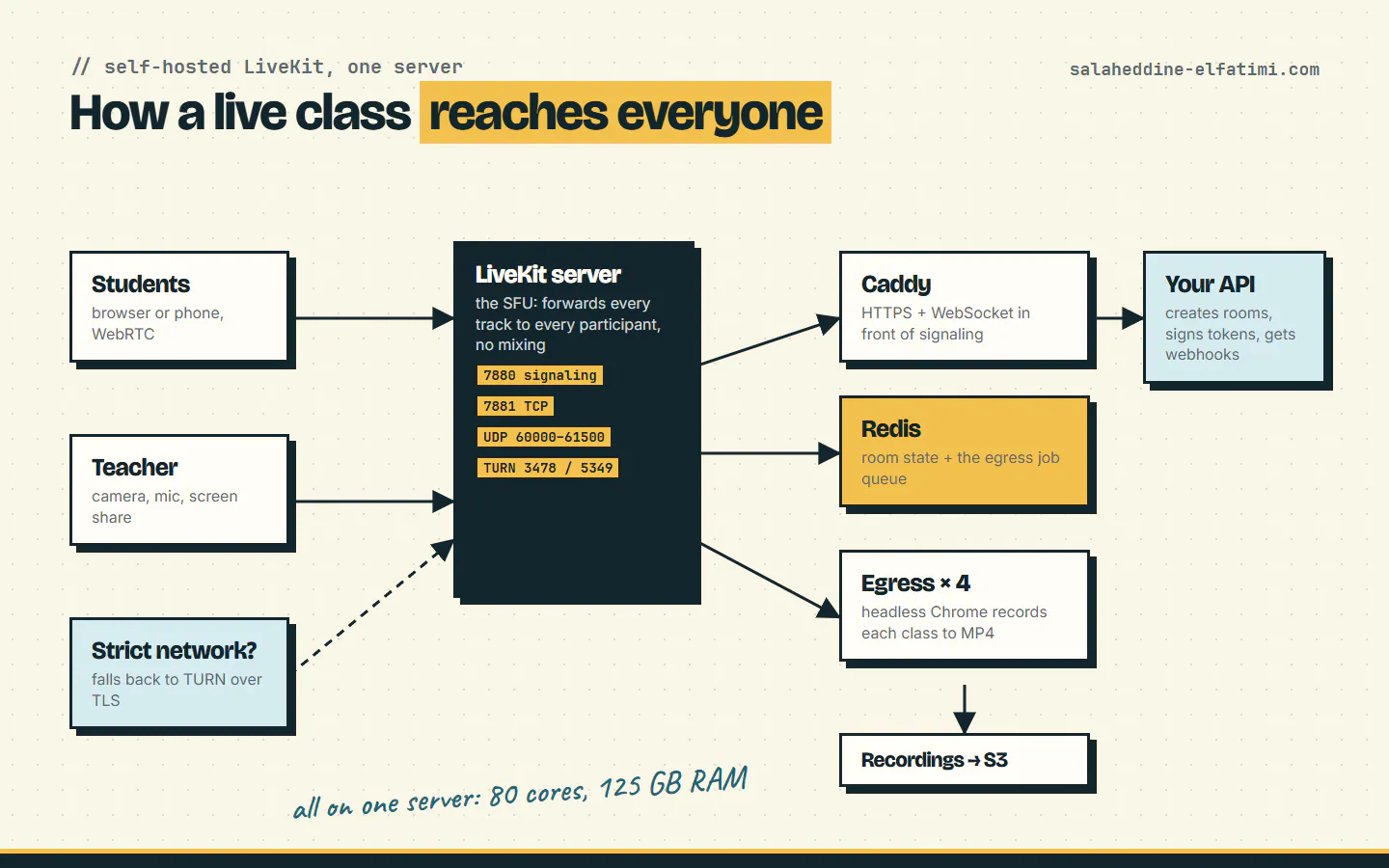
LiveKit is an SFU: it receives each participant's audio and video and forwards it to everyone else, without mixing anything. A working setup has more pieces than the server itself:
- LiveKit server, the SFU, running in Docker.
- Redis, which holds room state and the job queue for recordings.
- A reverse proxy with HTTPS for the signaling WebSocket. I use Caddy because it handles certificates on its own.
- TURN, built into LiveKit, for users behind strict firewalls.
- Egress workers if you record classes. Each runs headless Chrome, PulseAudio and ffmpeg.
- Your own API that creates rooms, signs access tokens and receives LiveKit's webhooks.
The official LiveKit deployment guide covers the basics. What follows is what it takes to keep it running under real classes.
Which ports does LiveKit need?#
This is the part that breaks first. LiveKit needs its signaling port (7880, behind your proxy), TCP 7881 as a media fallback, a UDP range for WebRTC media, and the TURN ports: 3478 over UDP and 5349 over TLS. The ports and firewall page lists them all.
We give WebRTC the range 60000 to 61500: 1,501 UDP ports, enough for about 500 participants. Publishing that many ports from Docker has a trap. By default Docker starts one docker-proxy process per published port, and 1,501 of them eat the host's memory. Turn the userland proxy off, and reserve the range so the kernel never hands those ports to other programs:
# /etc/docker/daemon.json
{ "userland-proxy": false }

# /etc/sysctl.d/99-livekit-ports.conf
net.ipv4.ip_local_reserved_ports = 60000-61500
Two more settings saved us real trouble. We set the server's external IP explicitly instead of letting LiveKit discover it over STUN, because on our host the container couldn't always resolve DNS and LiveKit kept restarting. And keep TURN over TLS (5349) switched on: it's the fallback for school, office and mobile networks that block plain UDP, and without it those users simply can't join.
Rooms that survive a bad connection#
Teachers drop off. Wi-Fi fails, a phone switches networks, a laptop sleeps. If the room closes the moment the last person leaves, the class is over and the recording stops with it. We create rooms from our API rather than letting LiveKit create them on join, and give them generous timeouts:
room:
  auto_create: false
  empty_timeout: 900       # 15 min for the first person to join
  departure_timeout: 300   # 5 min after the last person leaves
The recorder joins the room as a hidden participant, but it doesn't count as a person here, so a room with only the recorder left still closes on time.
Recording classes with LiveKit Egress#
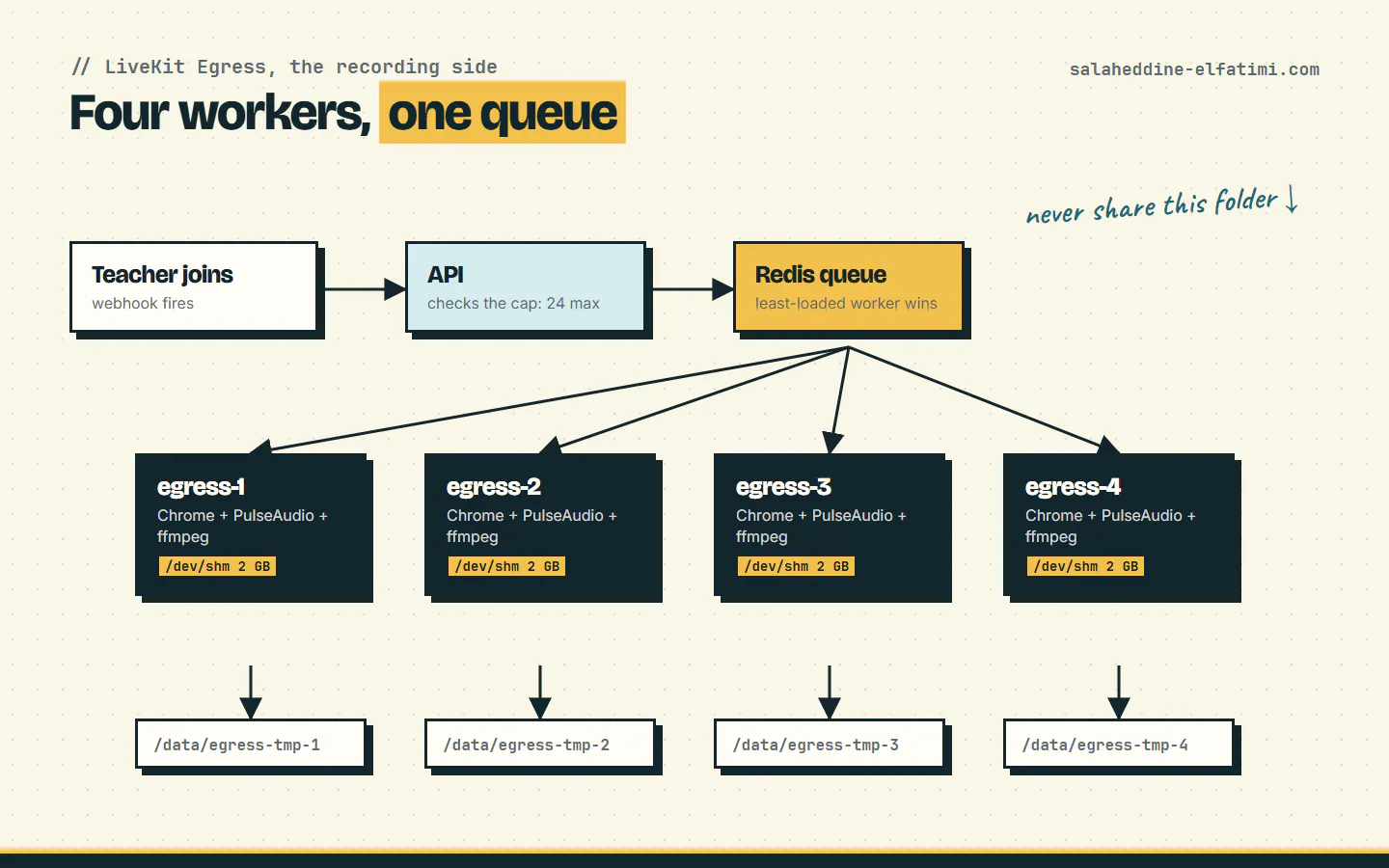
LiveKit Egress records a room by opening it in headless Chrome and encoding what it sees with ffmpeg. It works well, and it's heavy: every recording is a full browser. One worker carried about 5 to 8 recordings before the host struggled, so we run four workers that share one Redis queue. LiveKit hands each new recording to whichever worker has the most room.
A few settings made the difference between "works in testing" and "works on Monday morning":
- Shared memory. Docker gives containers 64 MB of
/dev/shmby default, which runs out at around five Chromes. We give each worker 2 GB. - A long stop grace period. Docker kills a container 10 seconds after asking it to stop, which kills the recordings inside it. With
stop_grace_period: 1h, a restart lets running classes finish first. - CPU priority. The SFU and the recorders get twice the default CPU weight, so a busy virus scan or a deploy doesn't make a live class stutter.
- Hairpin NAT. The workers run on the host network and reach LiveKit through the server's public IP. A small container keeps the iptables rule that routes that traffic back in, and re-applies it every 30 seconds.
The bug that looked like a capacity problem#
Right after we moved to four workers, recordings started failing in a strange pattern: one class recorded fine, five at once didn't. It looked like we'd run out of capacity. We hadn't. All four workers shared one temp folder, and when an egress worker starts, it deletes the other folders it finds there as stale. So each restart silently wiped the other workers' IPC sockets. Docker still reported them healthy, but every recording sent to them failed with:
dial unix /home/egress/tmp/<nodeID>/service_ipc.sock:
connect: no such file or directory
The fix is one line per worker: give each one its own host folder (/data/egress-tmp-1 to -4). If your workers pass health checks but recordings fail at start, check this first.
How many recordings fit on one server?#
We tested on the production host (80 cores, 125 GB RAM) with a script that starts recordings in parallel and checks every file afterwards:
| Recordings at once | CPU used | Files complete | Verdict |
|---|---|---|---|
| 4 | ~9 cores (egress) | 4 / 4 | Comfortable |
| 12 | ~20 cores (egress) | 12 / 12 | Comfortable |
| 24 | 48% of the host (egress) | 24 / 24 | Production cap |
| 30 | ~98% of the host (everything) | 30 / 30 | Works, no margin |
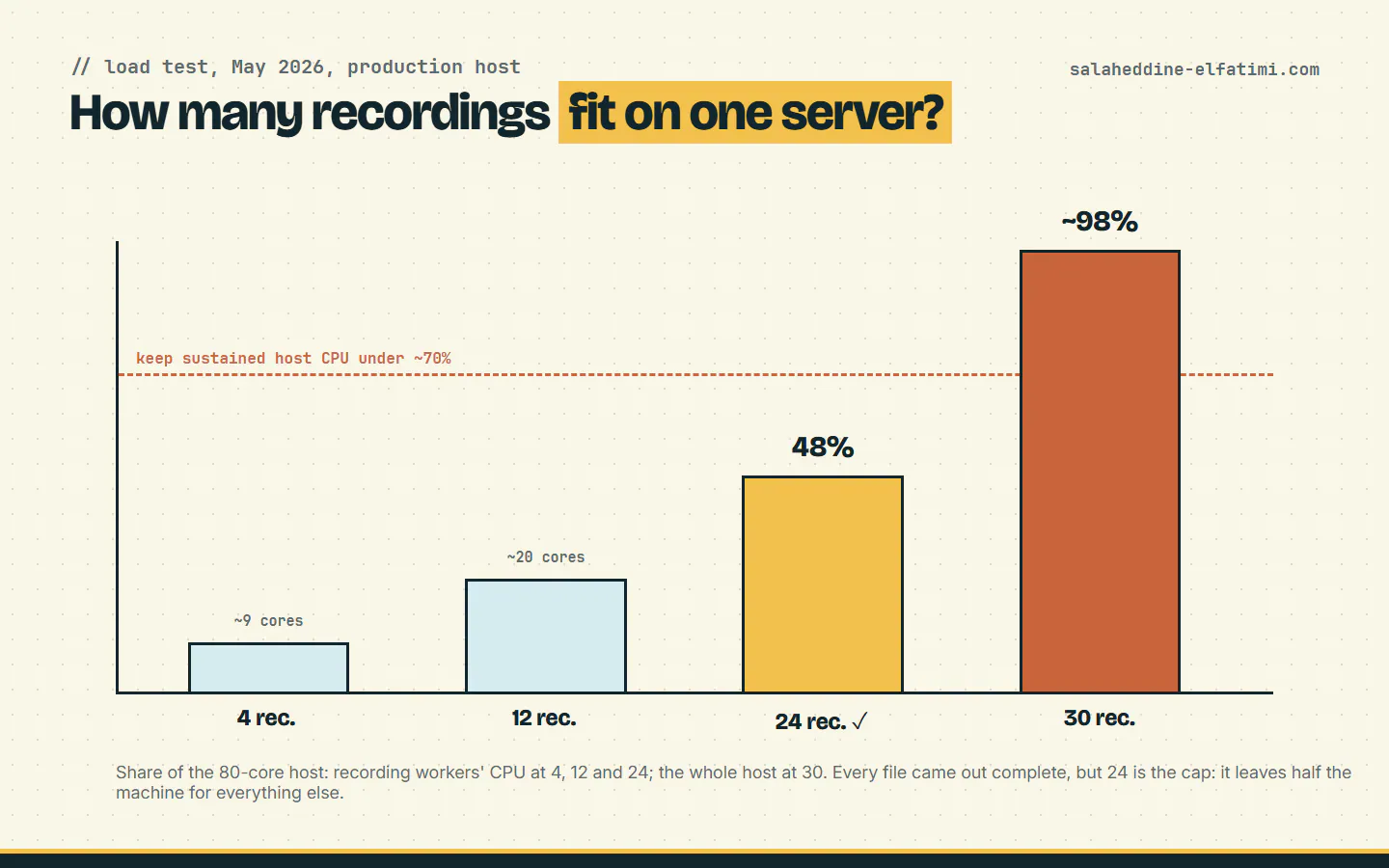
Thirty worked, but with nothing left for the rest of the server. So our API refuses to auto-start a 25th recording. The rule behind the cap is simple: losing one future recording is better than risking the 24 already running. It never stops a recording in progress, and admins can override it by hand when they need to.
What I'd tell you before you self-host LiveKit#
- Don't automate recovery. We once had a watchdog script that restarted "unhealthy" workers. One bad day it drained all four at the same time, and we lost between 13 and 21 recordings. Now egress incidents are handled by a person, with a recovery script.
- Plan the disk. A recording takes about 1 GB per hour. At 24 recordings over an 8-hour day that's around 190 GB, so move files to S3 storage on a schedule.
- Load test on the real machine. Our cap of 24 only holds for this hardware. Change the server, run the test again.
If you plan to self-host LiveKit for a platform of your own and want a hand with the video side, get in touch, or look at the platforms this setup runs.
Frequently asked questions
Can you self-host LiveKit?+
Yes. LiveKit's server and egress are open source and run in Docker. A production setup also needs Redis, a reverse proxy with HTTPS, TURN for strict networks, and an API that creates rooms and signs tokens.
Which ports does LiveKit need?+
Signaling on 7880 (behind an HTTPS proxy), TCP 7881, a UDP range for WebRTC media (we use 60000–61500), and TURN on UDP 3478 and TLS 5349.
How many recordings can one LiveKit egress worker handle?+
In our setup, about 5 to 8 before the host struggled, because each recording runs a full headless Chrome. Four workers on an 80-core server handled 24 at once.
Why do LiveKit egress recordings fail with a service_ipc.sock error?+
Usually because several egress workers share one temp folder. A starting worker deletes the others' folders as stale, removing their IPC sockets. Give each worker its own temp folder.
Written by
Full Stack Developer & Web Marketer · Marrakech, Morocco
I build modern, scalable web applications end to end, from frontend to backend, with a focus on performance, clean code and user experience.