- LiveKit
- E-learning
- WebRTC
- Live classes
Live classes without Zoom: how to build live video into your learning platform
Run live classes without Zoom: the video room inside your own platform, access by enrolment instead of by link, and recordings that come straight back to the student's dashboard.

· 5 min read
Key takeaways
- 1You can run live classes without Zoom by putting a WebRTC video server, such as LiveKit, inside your own learning platform.
- 2The platform signs a short-lived token for each enrolled student, so access follows the student's record instead of a shareable link.
- 3Rules like replay-only students, invited guests and staff controls are built in, and chat is saved with the session.
- 4Classes are recorded automatically and come back as replays on the same dashboard; a meeting link is still fine when live sessions are only an occasional extra.
You can run live classes without Zoom by putting the video inside your own learning platform. A WebRTC video server (I use LiveKit) runs the room, your platform decides who may join, and the class is recorded straight back into the same site. That's how the live programmes at CCL and Schoolaris work. Here's what that looks like, and what it takes to build.
Why a Zoom link falls short for a learning platform#
Most course platforms handle live classes the same way: you paste a Zoom, Google Meet or Teams link into a lesson. LearnWorlds works like that, and most "how to teach live online" guides stop there too. It's fine for an occasional webinar. For an academy that sells live programmes, it creates problems:
- The link is the key. Anyone who gets the link can try to join, and links get forwarded.
- Students leave your site for another app, another login and another brand, right at the moment that matters most.
- The data ends up somewhere else. Attendance, chat and recordings live in the meeting tool, not next to the student's programme.
- Your rules don't apply. A meeting tool doesn't know who paid, which cohort someone belongs to, or who should only watch the replay.
How live classes without Zoom work#
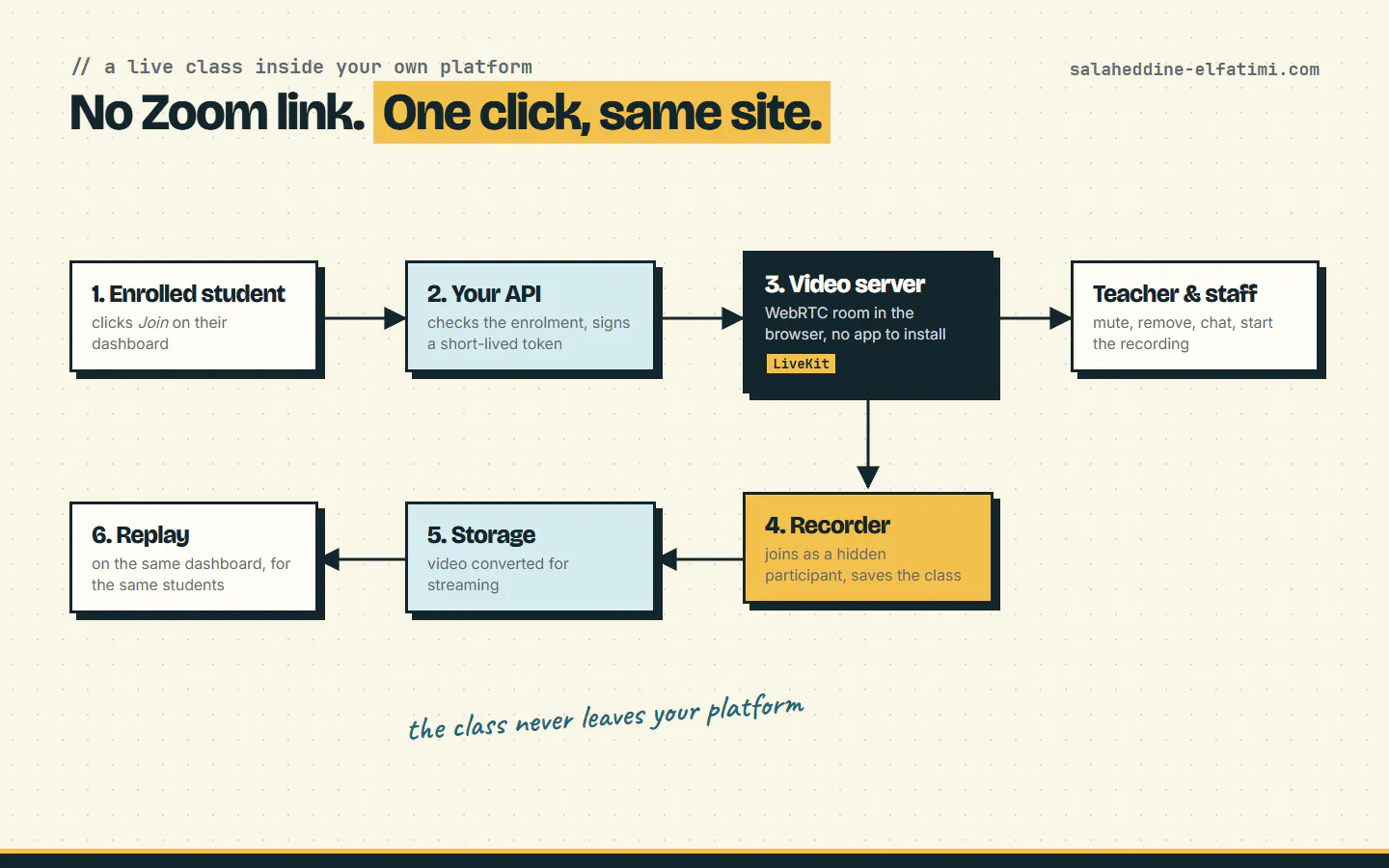
With the video inside the platform, a class goes like this:
- A student opens their dashboard and clicks Join on today's session.
- The platform's API checks that they're enrolled in that cohort and allowed live access, then signs a short-lived access token for that one room.
- The browser connects to the video server with that token. No app to install: WebRTC runs in any modern browser, on a phone or a laptop.
- The teacher runs the class from the back office, where staff can also mute or remove participants, use the chat, and start the recording.
- A recorder joins the room as a hidden participant and saves the class. The file goes to the platform's storage and is converted for streaming.
- The recording appears on the same dashboard, for the same students.
Nothing here needs a meeting link. The student never leaves the site, and every step runs on your rules.
Who gets into the room#
Because the platform signs the tokens, access follows the student's record instead of a URL. On CCL, the live page checks the enrolment before it hands out a token, and a few cases are handled explicitly:
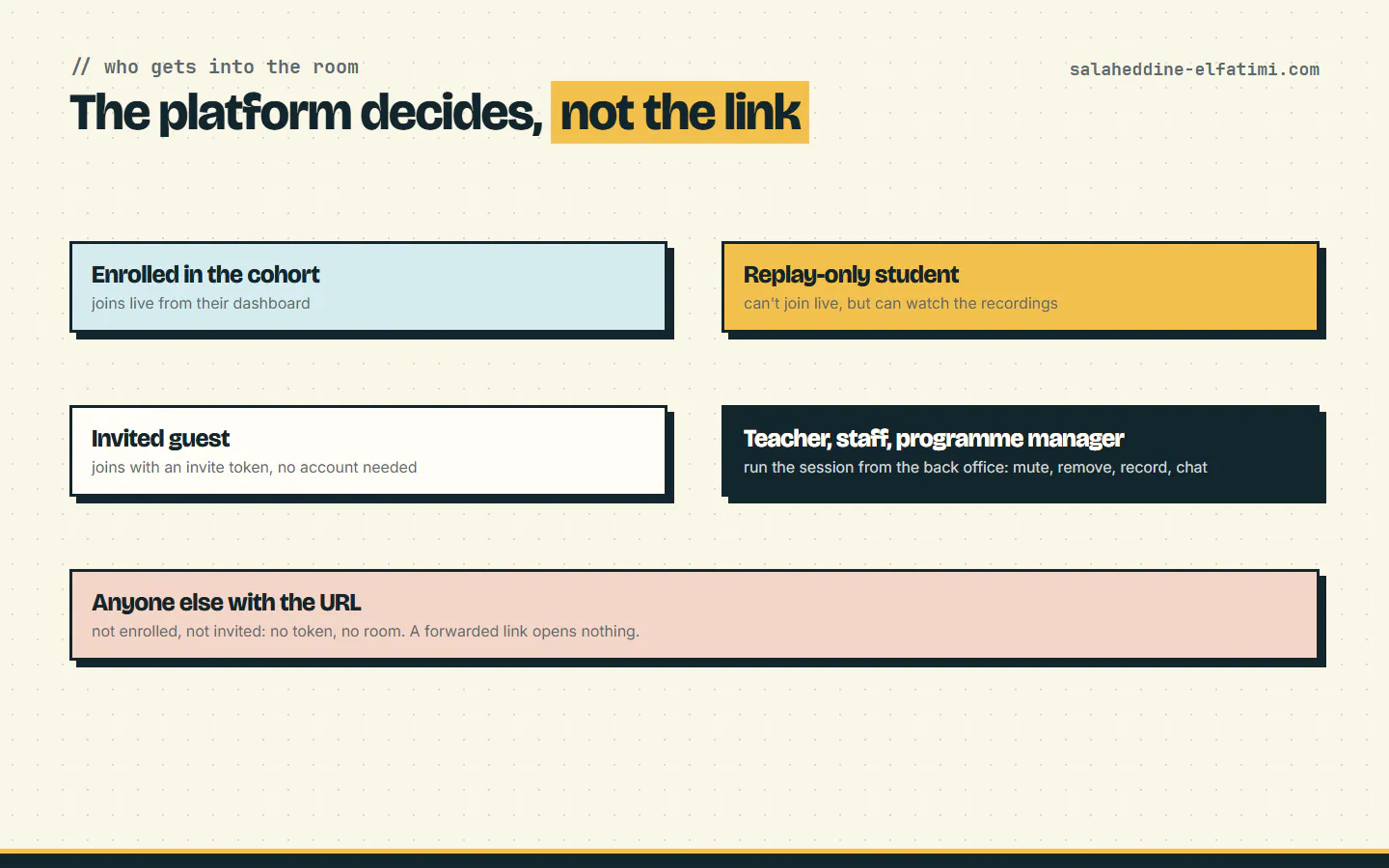
- Enrolled students join live from their dashboard.
- Replay-only students can't join live but can watch every recording. Staff can switch live access off per student.
- Guests join with an invite token, without creating an account.
- Teachers, staff and programme managers run sessions from the back office.
- Anyone else who gets hold of the URL gets no token, so there's no room to enter.
What teachers and staff can do during a class#
The live session has its own controls in the back office: mute a participant, remove someone, start and download the recording, follow the chat, and read the session logs. The chat is saved against the session, so it stays with the class instead of vanishing when the room closes. Screen sharing works like in any meeting tool.
One detail I'd recommend copying: keep a way out. On CCL, a session can still point to a Google Meet link if staff choose to, and the page sends students there instead. The built-in room is the default, but a live programme should never be stuck because of one bad day.
Recording live classes automatically#
Recordings are where a built-in room pays off most. LiveKit's Egress service records a room by opening it in a headless browser and encoding what it sees. On our server, four recording workers share one queue, and in a load test 24 classes recorded at the same time with every file complete. Each recording lands in storage, gets converted for adaptive streaming, and shows up as a replay page on the platform.
I wrote up the whole server side, including the bug that looked like a capacity problem, in how to self-host LiveKit for live classes.
Zoom links vs live video built into your platform#
| Zoom / Meet link in a lesson | Live video inside your platform | |
|---|---|---|
| Who can join | Anyone with the link | Only students your platform signs a token for |
| Where students go | Another app and login | Stay on your site, in the browser |
| Recordings | In the meeting tool | In your storage, replayed on the dashboard |
| Chat and attendance | In the meeting tool | Saved with the session |
| Rules like replay-only access | Handled by hand, outside the tool | Built into the platform |
| Setup effort | Minutes | Real development work |
What you need to build it#
- A video server. An SFU like LiveKit, self-hosted or on LiveKit Cloud. Hosted video SDKs such as Zoom's Video SDK or Agora are also options, priced per minute.
- TURN over TLS, so students on strict school, office or mobile networks can still connect.
- A token endpoint in your API that checks enrolment and signs access for one room at a time.
- Webhooks from the video server, so your platform knows when a class starts, ends, or finishes recording.
- Recording workers and storage, if you record: they need real CPU and disk, and a plan for where files end up.
- The classroom page itself: video tiles, screen sharing, chat, and the staff controls.
None of this is exotic, but it is a project: plan it like one.
When a Zoom link is still the right choice#
If live sessions are an occasional extra, like a monthly Q&A next to self-paced courses, a meeting link is simpler and costs nothing to build. Running live classes without Zoom makes sense when live teaching is what you sell: cohorts, schedules, attendance, recordings and access rules all depend on it. That was the case for CCL, and part of why it left LearnWorlds.
Want live classes inside your platform?#
If your academy runs live programmes on meeting links and you'd like to run live classes without Zoom, inside your own platform, tell me about your setup. You can also see the platforms I've built that already run this way.
Frequently asked questions
Can you run live classes without Zoom?+
Yes. Put a WebRTC video server such as LiveKit inside your learning platform. Students join from their dashboard in the browser, and the platform decides who can enter each room.
Do students need to install an app for live classes in the browser?+
No. WebRTC runs in modern browsers on phones and computers, so students join from the platform's page directly.
Can live classes be recorded automatically?+
Yes. A recorder such as LiveKit Egress joins the room as a hidden participant and saves the class to your storage, where it can be converted for streaming and replayed on the platform.
Is building live video worth it compared with a Zoom link?+
It is when live teaching is what you sell and you need access rules, recordings and attendance inside your platform. For an occasional session next to self-paced courses, a meeting link is simpler.
Written by
Full Stack Developer & Web Marketer · Marrakech, Morocco
I build modern, scalable web applications end to end, from frontend to backend, with a focus on performance, clean code and user experience.