- E-learning
- Case study
- Next.js
LearnWorlds export: how to get your courses, videos and students out
LearnWorlds doesn't export a course as a file. What you can download, what stays behind, and a six-step plan to move your courses, videos and students to your own platform.

· 5 min read
Key takeaways
- 1A LearnWorlds export gives you data, not courses: users, sales, activity logs, progress and quiz answers come out as CSV or XLS.
- 2Entire courses can't be exported as a file, and the export guide lists no way to download uploaded videos, so keep your originals.
- 3Progress exports need Pro Trainer and the API needs Learning Center, so export before you downgrade or cancel.
- 4Cancelling your plan doesn't cancel your learners' subscriptions: stop those in LearnWorlds or Stripe yourself.
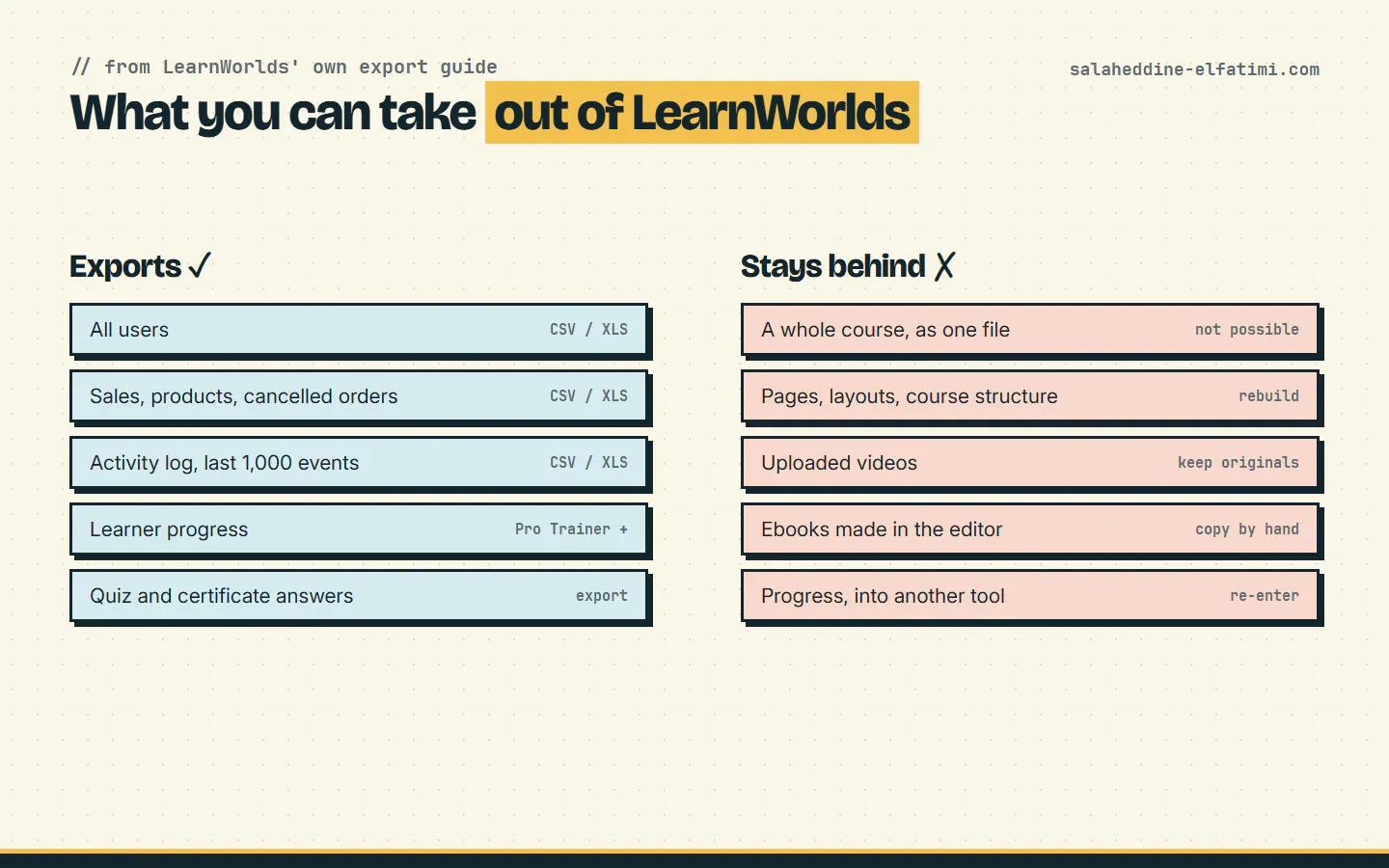
A LearnWorlds export gets you your data, not your courses. You can download users, sales, activity logs, learner progress and quiz answers as CSV or XLS files. But LearnWorlds says it plainly: entire courses cannot be exported as a single file. Pages, course structure and uploaded videos have to be rebuilt, or re-uploaded from your own copies.
This guide is for schools and training centres thinking about leaving LearnWorlds, or just wanting a backup. It's based on LearnWorlds' own export guide and help articles, and on moving CCL, a Moroccan training academy, off LearnWorlds to a platform I built for it.
What does a LearnWorlds export include?#
Everything below comes out as a CSV or XLS file, from your admin area:
- All users, from Users → All Users.
- Sales records, plus products, instructors' revenue and cancelled orders, from Reports Center → Sales.
- The activity log, from Reports → Activity Logs → Events. Only the last thousand entries, so export it early and more than once if you need history.
- Learner progress, from the Reports Center on the Pro Trainer plan and higher. On Learning Center and higher, the API gives you all progress data.
- Assessment and certificate questions, with your learners' answers.
That covers who your students are, what they bought and how far they got. It's the part you can't recreate, so it's the part to export first.
What you can't export from LearnWorlds#
The export guide is just as clear about the limits:
- Whole courses. A course can't be exported as one file. There's no package you can import into another platform.
- Pages and course structure. Sections, learning activities, page layouts and your school's design stay on LearnWorlds. You rebuild them on the new platform.
- Uploaded videos. The export guide lists no way to download the videos you uploaded. Your own original files are the copy that counts.
- PDFs and ebooks. LearnWorlds expects you to have them locally, since you uploaded them in the first place. An ebook written in its editor can only be copied and pasted out.
LearnWorlds can copy whole courses, but only between LearnWorlds schools in the same organization. Even then, users and their progress don't come along: you export them from one school, import them into the other and update their progress by hand.
LearnWorlds export options, plan by plan#
What you can get out depends on your plan. This matters if you're about to downgrade to save money before leaving: do the LearnWorlds export first.
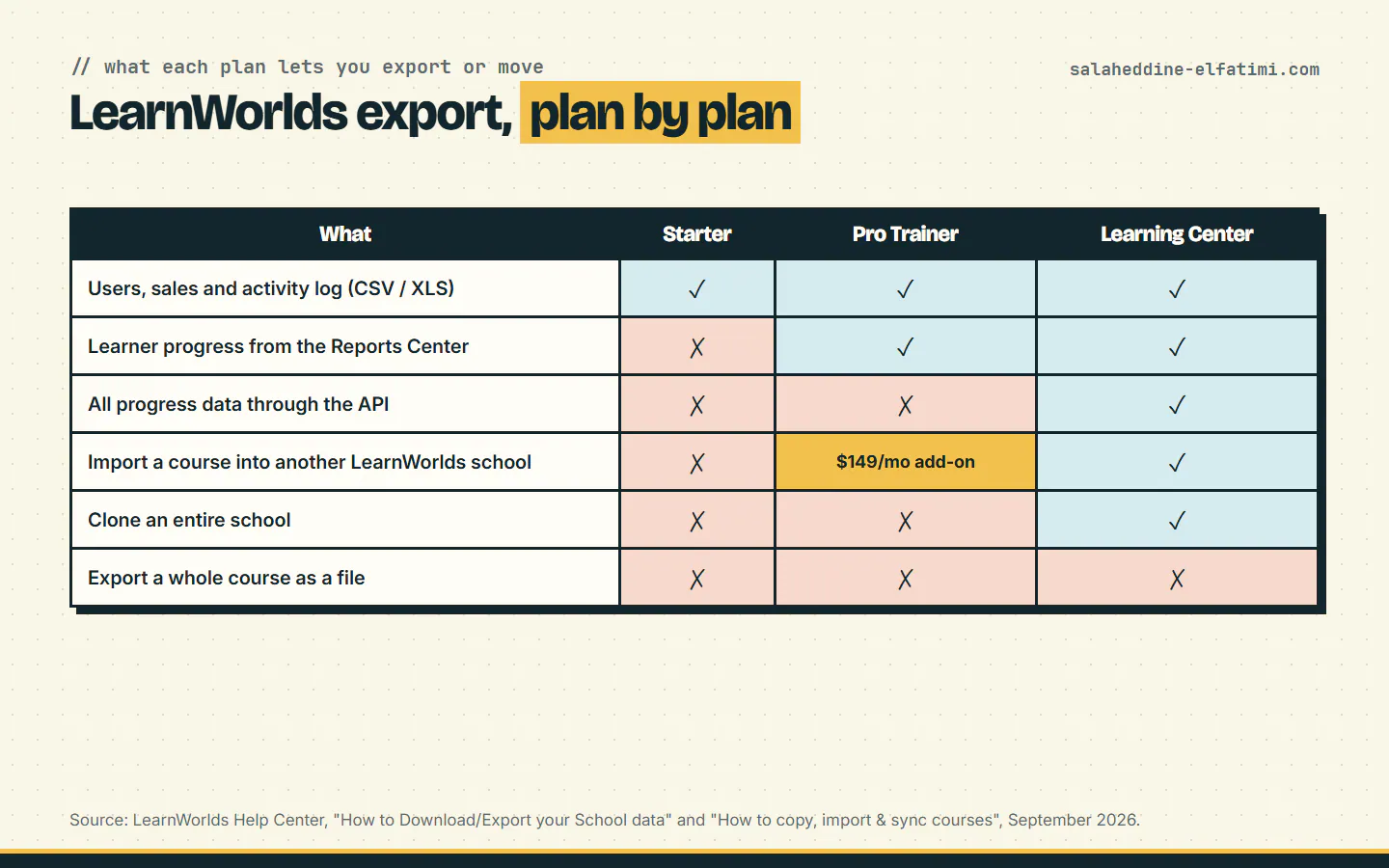
| What | Starter | Pro Trainer | Learning Center |
|---|---|---|---|
| Users, sales and activity log (CSV/XLS) | Yes | Yes | Yes |
| Learner progress from the Reports Center | No | Yes | Yes |
| All progress data through the API | No | No | Yes |
| Import a course into another LearnWorlds school | No | $149/month add-on | Yes |
| Clone an entire school | No | No | Yes |
| Export a whole course as a file | No | No | No |
How do you move your students without losing them?#
Students are the hard part, because they're what your business runs on. A good move keeps three things:
- Their account. Import them from the users CSV, with the email address as the key. Plan how they'll sign in the first time, for example with a sign-in link sent by email, so nobody is stuck at a password screen.
- What they paid for. Rebuild each learner's enrolments from the sales export, so every student lands in the courses they bought.
- What they finished. Completed courses and certificates earned matter most. Decide early how much progress you carry over, because some of it will be entered by hand.
Tell students before the switch, with the date and the new address. A short email the week before saves a lot of support messages the week after.
Leaving LearnWorlds in six steps#
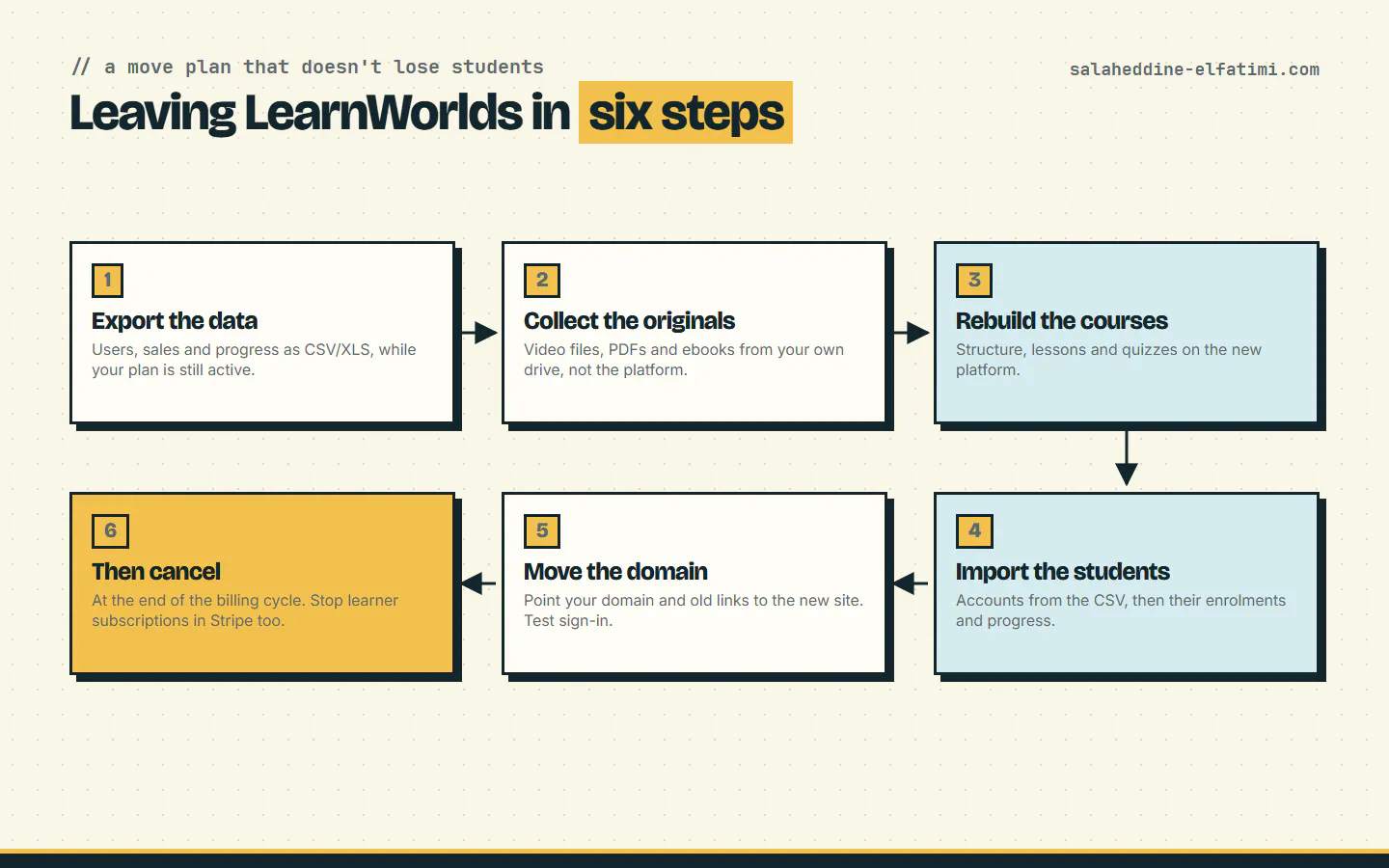
- Export the data while your plan is still active: users, sales, activity log, progress and assessment answers.
- Collect the originals: video files, PDFs and ebooks from your own drive or your video editor, not from the platform.
- Rebuild the courses on the new platform: structure, lessons, quizzes and certificates.
- Import the students from the CSV, then their enrolments and the progress you decided to keep.
- Move the domain. Point your school's domain to the new site and redirect old course links, so bookmarks and search results still work.
- Then cancel, at the end of the billing cycle, once everything works on the new platform.
What happens when you cancel LearnWorlds?#
You cancel from My account → Account & Billing → Subscriptions → Cancel subscription. According to LearnWorlds, the cancellation is scheduled for the end of your current billing cycle, and you can reactivate until then. So you keep access, and your LearnWorlds export options, until that date.
One detail catches people out: cancelling your LearnWorlds plan doesn't cancel your learners' subscriptions. To stop their recurring payments you unenroll them from the product or cancel their subscriptions in Stripe yourself. Do it on purpose, and tell them what replaces it.
Where CCL went instead#
CCL paid LearnWorlds $254.15 a month and still ran its live classes through Zoom. It moved to its own platform: live certifying programmes on ccl.ma and self-paced video courses on elearning.ccl.ma, with live classes on its own servers. I wrote up why CCL left LearnWorlds and what it built instead.
These are the e-learning platforms I've built and run, each one on its own code and its own data:
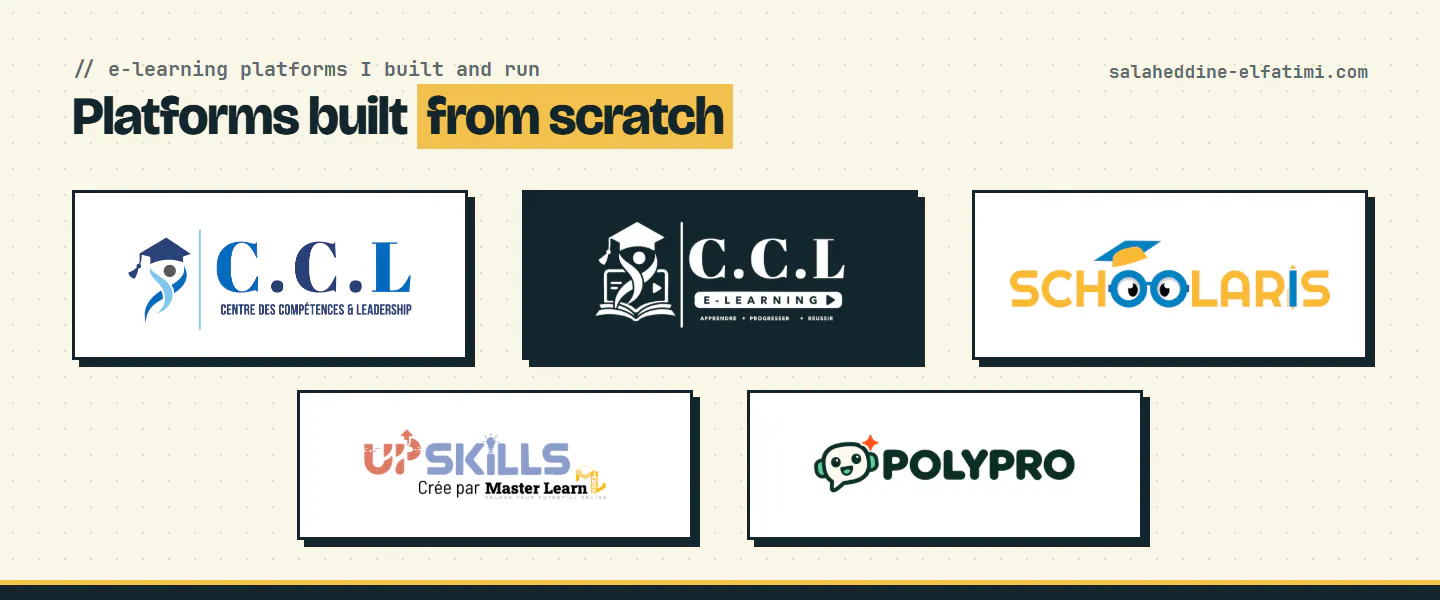
- CCL: live certifying programmes with cohorts, online enrolment and payment, and certificate verification.
- CCL E-Learning: short recorded courses and learning paths with quizzes, progress tracking and certificates.
- Schoolaris: online tutoring for Moroccan pupils, with live classes, recorded courses and a parent space.
- UpSkills: professional and soft-skills courses in English and French, paid online or by transfer.
- Polypro Academy: self-paced language learning on the web and in iOS and Android apps.
What I'd check before cancelling#
- Export twice. Once when you decide, once the day before you switch, so late sign-ups and sales aren't lost.
- Find your video originals now. If some only exist on LearnWorlds, find out how you'll get them back before you depend on it.
- Keep the old links working. Redirect course pages to their new addresses so you don't lose the traffic you built.
- Don't downgrade first. Progress exports need Pro Trainer, and the API needs Learning Center. Export, then downgrade or cancel.
If you're weighing a LearnWorlds export and a move to your own platform, tell me how your school works today. You can also see the platforms I've built and what an e-learning platform costs.
Frequently asked questions
Can you export a course from LearnWorlds?+
Not as a whole. LearnWorlds says entire courses can't be exported as a single file. You can export users, sales, activity logs, progress and assessment answers, and copy courses only between LearnWorlds schools in the same organization.
Can I download my videos from LearnWorlds?+
LearnWorlds' export guide lists no way to download the videos you uploaded. Keep your original video files, and use them when you move to another platform.
What happens to my students when I leave LearnWorlds?+
Their data stays on LearnWorlds unless you export it. Export the users and sales CSVs, import the accounts on the new platform, rebuild their enrolments, and carry over the progress that matters, such as completed courses and certificates.
Does cancelling LearnWorlds cancel my learners' subscriptions?+
No. Cancellation takes effect at the end of your billing cycle, and learners' recurring subscriptions keep running until you unenroll them or cancel them in Stripe.
Written by
Full Stack Developer & Web Marketer · Marrakech, Morocco
I build modern, scalable web applications end to end, from frontend to backend, with a focus on performance, clean code and user experience.