- SEO
- Morocco
How to get more Google reviews with a QR code (without breaking Google's rules)
Get more Google reviews by asking at the right moment: copy your review link, print a QR code poster for your counter or tables, and never offer a gift in exchange. A guide for restaurants, riads, clinics and shops in Morocco.
On this page
- Why don't happy customers leave reviews?
- Where do I find my Google review link?
- How do I turn the link into a QR code and a poster?
- Where should I put the QR code?
- What happens after a customer scans it?
- Can I offer a discount or a gift for a review?
- How do I get more Google reviews over time?
- Reviews bring people to your profile. Then what?
- Frequently asked questions
Key takeaways
- To get more Google reviews, ask every customer while they're still at your place, with a QR code of your review link they can scan.
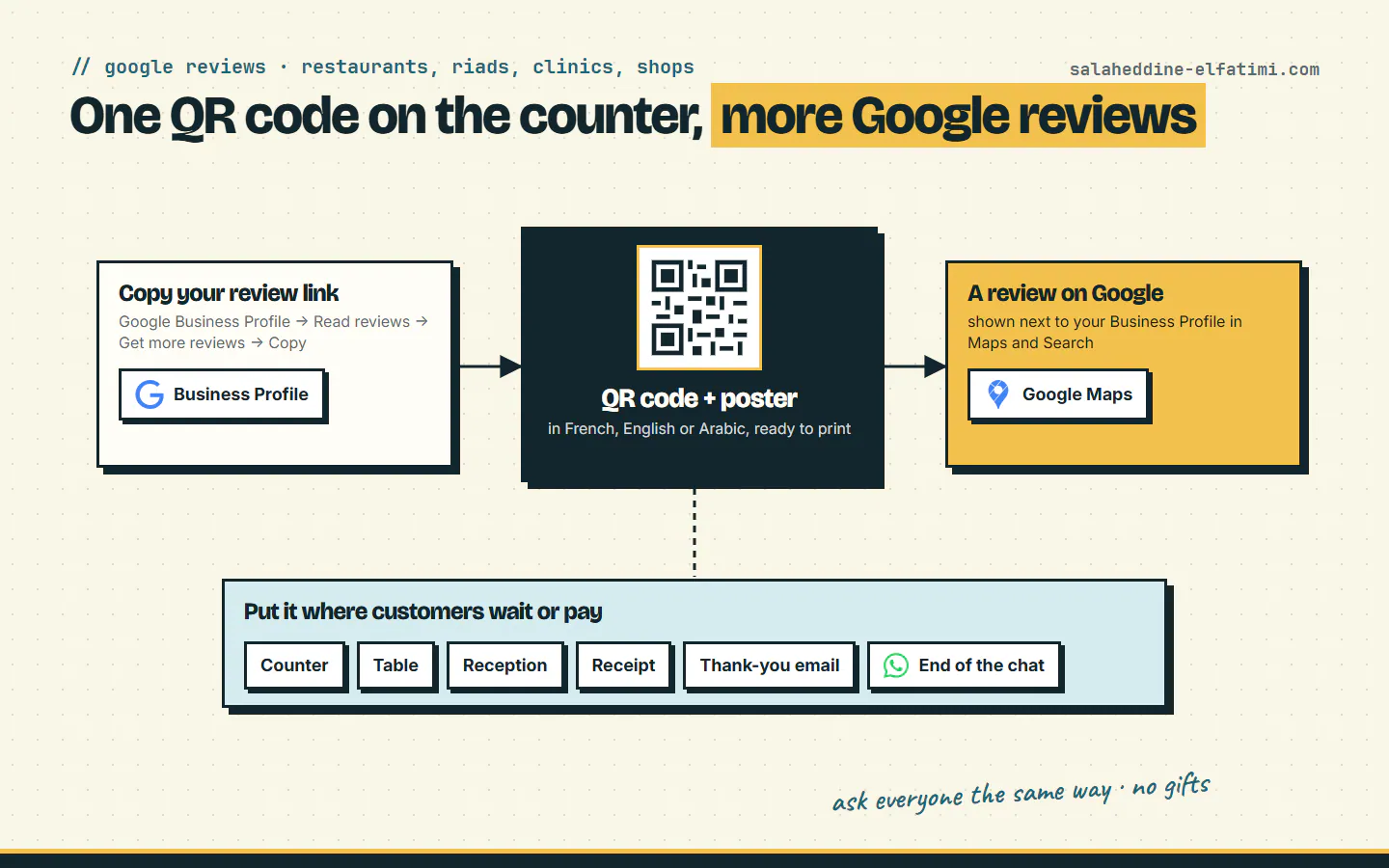
- Copy the review link on a computer: Business Profile, Read reviews, Get more reviews, Copy; Google doesn't offer it on the phone.
- Put the QR code on a poster where customers wait or pay: counter, tables, reception, receipts, and the end of a WhatsApp chat.
- Never offer a discount or a gift for a review: Google prohibits it and can block new reviews or show a warning on your profile.
The simplest way to get more Google reviews is to ask every customer at the right moment, with a QR code they can scan before they leave. Copy the review link from your Google Business Profile, turn it into a QR code, print it on a poster for your counter, tables or reception, and never offer anything in exchange. Here is how, step by step, for a restaurant, riad, clinic or shop in Morocco.
Why don't happy customers leave reviews?#
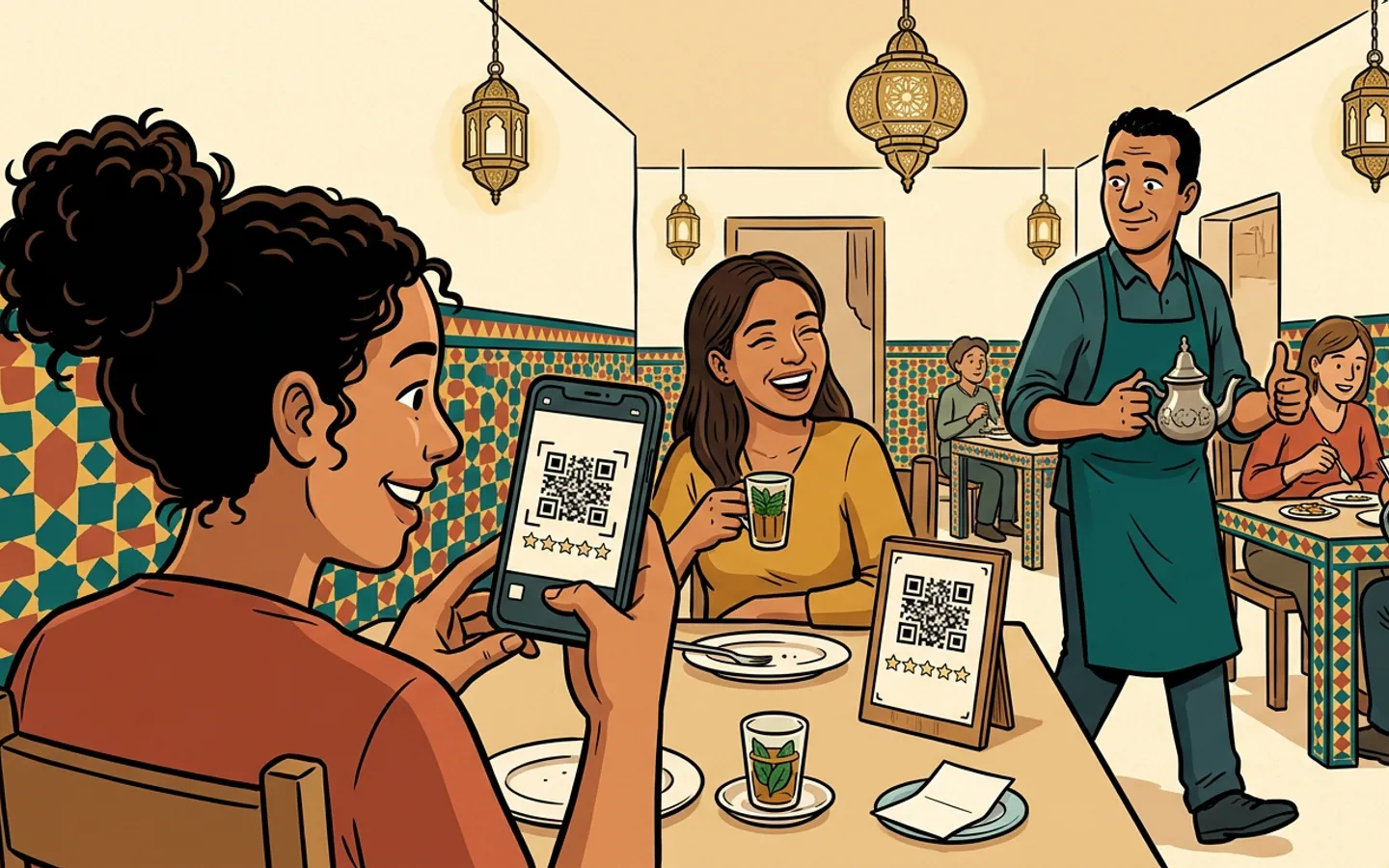
Picture a good evening at your restaurant. The couple at table four loved the tagine, thanked the waiter twice, and said "we'll tell our friends". Then they paid, left, and never thought about it again. Nobody was rude. Nobody asked.
That's the whole problem. Happy customers need a nudge, and the nudge has to arrive while they're still at your place, phone in hand, waiting for the bill or the taxi.
If you want to get more Google reviews, remember where they count: Google says they show next to your Business Profile in Maps and Search, the same place a tourist looks before choosing where to eat or sleep tonight.
Where do I find my Google review link?#
Every Google Business Profile has a link that opens the review form for your business directly. According to Google's help page on review links and QR codes, you get it like this:
- On a computer, go to your Business Profile (search your business name on Google while signed in).
- Select Read reviews, then Get more reviews.
- Select Copy to copy the review link.
One catch: Google says these review QR codes can only be generated on a computer browser, not on a phone. So if you've been tapping around the Business Profile app looking for the button, the button was never there. Borrow a laptop.
How do I turn the link into a QR code and a poster?#
Google's page lets you save a plain QR code image. That works, but a bare square on a wall doesn't tell anyone what it's for. People scan a code when the poster around it says why, and that sentence on the poster is what helps you get more Google reviews. That's why I built a free Google review QR code tool that makes both: the code and a poster to print.
- Paste your review link and the QR code is drawn in your browser. It warns you if the link isn't a Google link.
- Pick the poster's language: French, English, Arabic, or two at once (French + Arabic, English + French), so the request is in the language your customers read.
- Make it yours: your business name, your logo, a photo of your place, a colour and one of six designs.
- Print it in A4 or A5, or download it as an image to send to a print shop or share on WhatsApp.
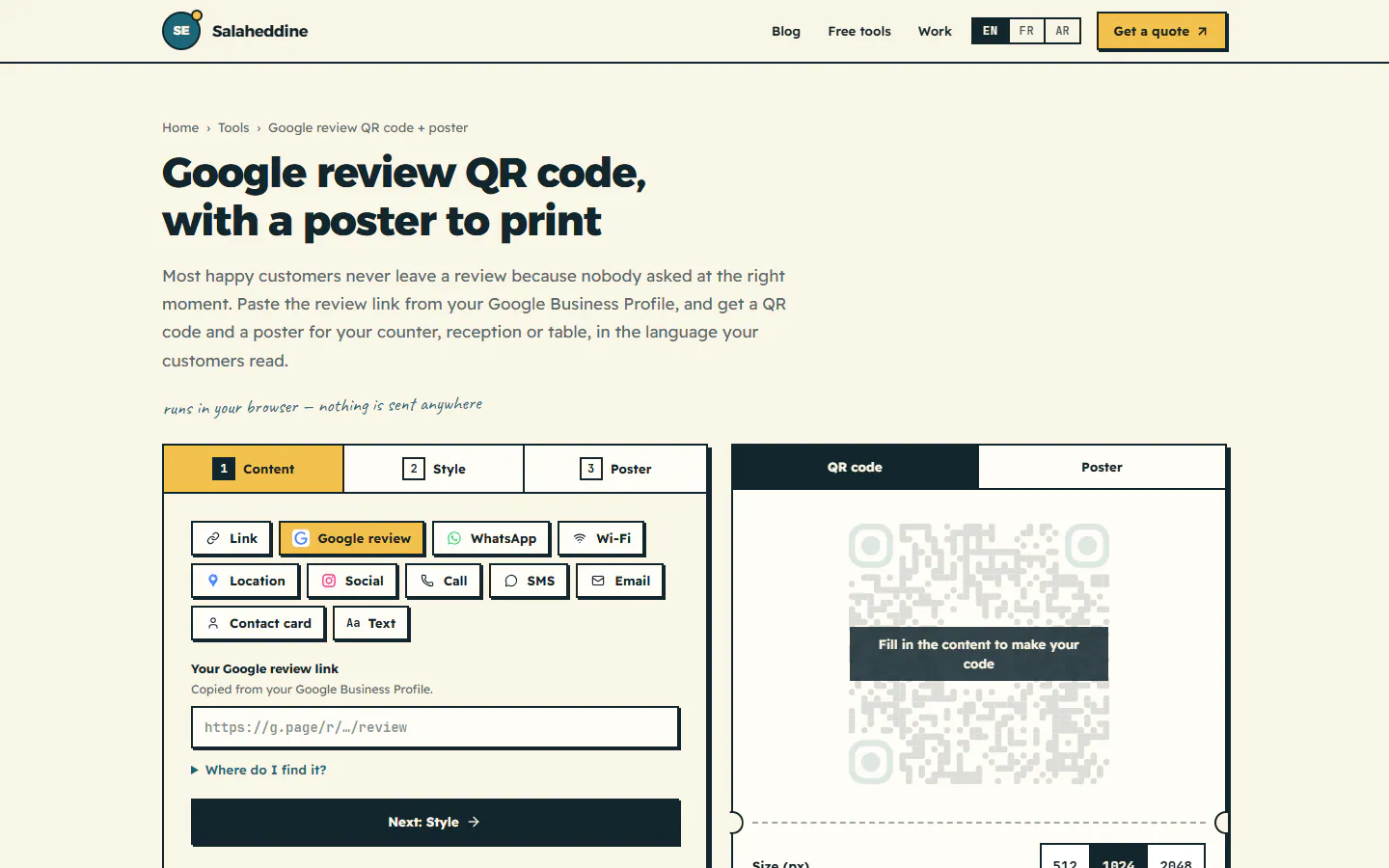
Nothing you type is sent anywhere or stored: the code and the poster are made on your device. And the QR code doesn't expire. It's a plain code of your review link, with no tracking service in between and no subscription, so it keeps working as long as your Business Profile exists. Print it once, laminate it, forget it.
Where should I put the QR code?#
Where customers wait or pay, because that's when they have a free minute and a phone out. Placement is half of how you get more Google reviews. Google itself suggests receipts, thank-you emails, the end of a chat with a customer, and printing the QR code to display in your store. By type of business, that gives:
- Restaurant or café: a small stand on each table, a poster (an affiche, as your printer will call it) next to the till, a line on the bill.
- Riad or hotel: a card in the room, a poster at reception, and the link in the goodbye message on WhatsApp.
- Clinic or practice: a poster in the waiting room and at the reception desk, where patients sit with their phone anyway.
- Shop: a poster by the till, and a printed code on the receipt or the bag.
The same link works without a poster too: Google notes you can send review requests by email, WhatsApp message or a Facebook post. For a menu, your Wi-Fi or your WhatsApp number, use the general QR code generator with logo instead; it makes the same kind of poster for other links.
What happens after a customer scans it?#
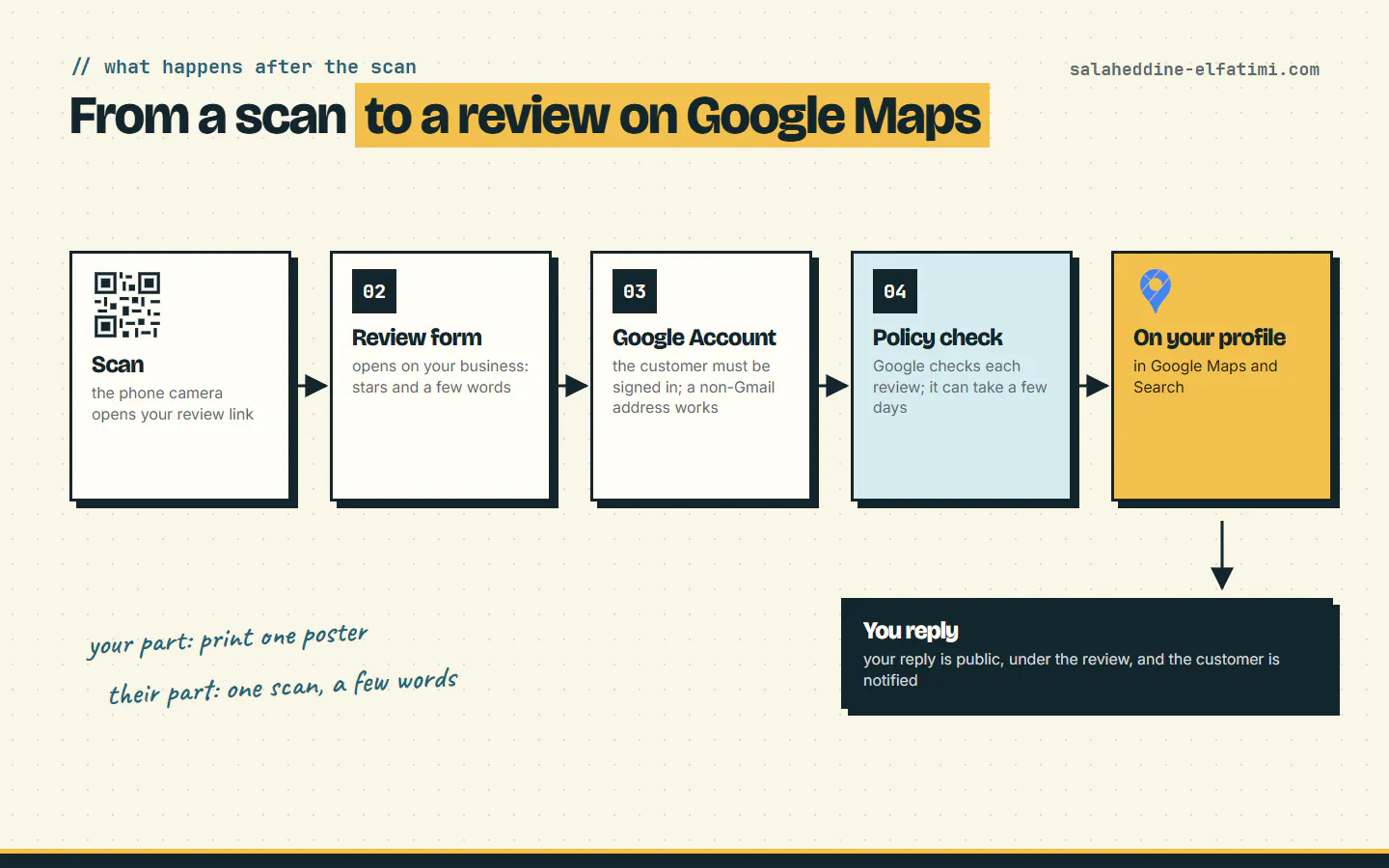
The customer's side is short, but it helps to know the steps:
- The phone camera opens your review link, and the review form for your business appears.
- To leave a review, the customer must be signed into a Google Account. Google adds that it can be set up with a non-Gmail email address.
- Google checks reviews against its policies, and in some cases that takes a few days. A review that doesn't appear in the next minute isn't lost.
- Once approved, the review shows on your profile in Maps and Search.
Can I offer a discount or a gift for a review?#
No, and this is the one rule worth printing next to the poster: there is no paid shortcut to get more Google reviews. In Google's own words, offering incentives, like free or discounted goods or services, in exchange for customers to post reviews, change reviews or remove negative reviews is considered fake and misleading content and is strictly prohibited.
"Free mint tea for five stars" sounds friendly. To Google it's fake engagement, and the penalties are real. On its page about Business Profile restrictions, Google lists what can happen besides removing the reviews:
- the profile can't receive new reviews or ratings for a set period,
- the existing reviews and ratings are unpublished for a set period,
- the profile shows a warning telling customers that fake reviews were removed.
That last one is the opposite of what you wanted. So ask every customer the same way, happy or not, and let the reviews be what they are. Google even notes that a mix of positive and negative feedback often feels more trustworthy.
How do I get more Google reviews over time?#
A poster gets you started. These habits are how you get more Google reviews month after month:
- Ask out loud as well. "If you enjoyed it, the code on the table is for that" turns a poster into a question. A poster nobody points at is wallpaper.
- Reply to reviews. Your reply is posted publicly under the review, it appears as your business (not your personal name), and the customer is notified. You need a verified profile to reply.
- Reply to the bad ones too. Calmly, without sharing anyone's private details. Google points out that customers can still change their review after reading your reply.
- Keep replies human, not promotional. Google advises against using replies to offer deals. Answer the person, not the algorithm.
- Check the poster every few months. Faded, hidden behind the napkins, or covered by the new menu? Print a fresh one.
Reviews bring people to your profile. Then what?#
Google reviews help people choose you; your website is where they check the menu, the rooms or the services, and book. If you run a restaurant, I explain what to put online in restaurant website in Morocco; for a riad, riad website design for direct bookings; for a clinic, site web clinique au Maroc (in French).
To get more Google reviews from the customers already at your place, start today with the free Google review QR code and poster. And if your Google profile is bringing visitors to a site that doesn't convince them, have a look at what I build for business websites, or tell me about your business and I'll reply with what I'd change.
Frequently asked questions
Where do I find my Google review link?+
On a computer, open your Google Business Profile, select Read reviews, then Get more reviews, and select Copy. Google only offers the review QR code on a computer browser, not on mobile devices.
Can I offer a discount or a gift in exchange for a Google review?+
No. Google says offering free or discounted goods or services in exchange for posting, changing or removing reviews is strictly prohibited. It can stop your profile receiving new reviews for a period, unpublish existing ones, or show a warning that fake reviews were removed.
Does a Google review QR code expire?+
No, not a plain QR code of your review link, like the one the free tool makes: there is no tracking service or subscription in between, so it keeps working as long as your Business Profile exists.
Why doesn't a new review show up on my profile right away?+
Google checks reviews against its policies, and in some cases that takes a few days. The customer also needs to be signed into a Google Account to leave the review.

Written by
Full Stack Developer & Web Marketer · Marrakech, Morocco
I build modern, scalable web applications end to end, from frontend to backend, with a focus on performance, clean code and user experience.