- Multilingual
- Morocco
- SEO
- Next.js
Arabic website design: what changes when your site goes right to left
Arabic website design from real sites: right-to-left layout, which icons flip, Arabic fonts and line height, prices and brand names that read backwards, digits, forms, and Darija vs standard Arabic.
On this page
- What changes when your website gets an Arabic version?
- Which icons and arrows flip, and which don't?
- Which Arabic fonts, and why does line height change?
- Why do prices and brand names come out backwards?
- Western or Arabic-Indic digits?
- How should forms and phone numbers work in Arabic?
- Darija or Modern Standard Arabic for the copy?
- My Arabic website design checklist before launch
- Planning an Arabic version of your website?
- Frequently asked questions
Key takeaways
- An Arabic version starts with lang="ar" dir="rtl" on the html tag and start/end instead of left/right in the styles, so the layout mirrors itself.
- Flip the arrows that mean "go" or "next"; keep logos, up and down arrows, phone numbers and the language switch as they are.
- Wrap prices, phone numbers and Latin brand names inside Arabic text in a bdi element, or they can come out in the wrong order.
- Write the copy in your clients' Arabic, but put the standard Arabic phrases people search, typed without hamzas, in the headings and titles.
Arabic website design is more than translated text. The whole page turns around: it reads right to left, the menu and columns mirror, and some arrows flip while others must not. Arabic needs its own fonts and more line height, numbers and Latin brand names need care inside Arabic sentences, and the words should match what people actually type. Here is what I change when a business site gets an Arabic version, from sites I've built.
What changes when your website gets an Arabic version?#
Picture the moment: the Arabic version goes live, you open it on your phone, and the price on your offer reads "1,000$~". Nobody changed the price. The browser just put the pieces in Arabic order. Welcome to Arabic website design.
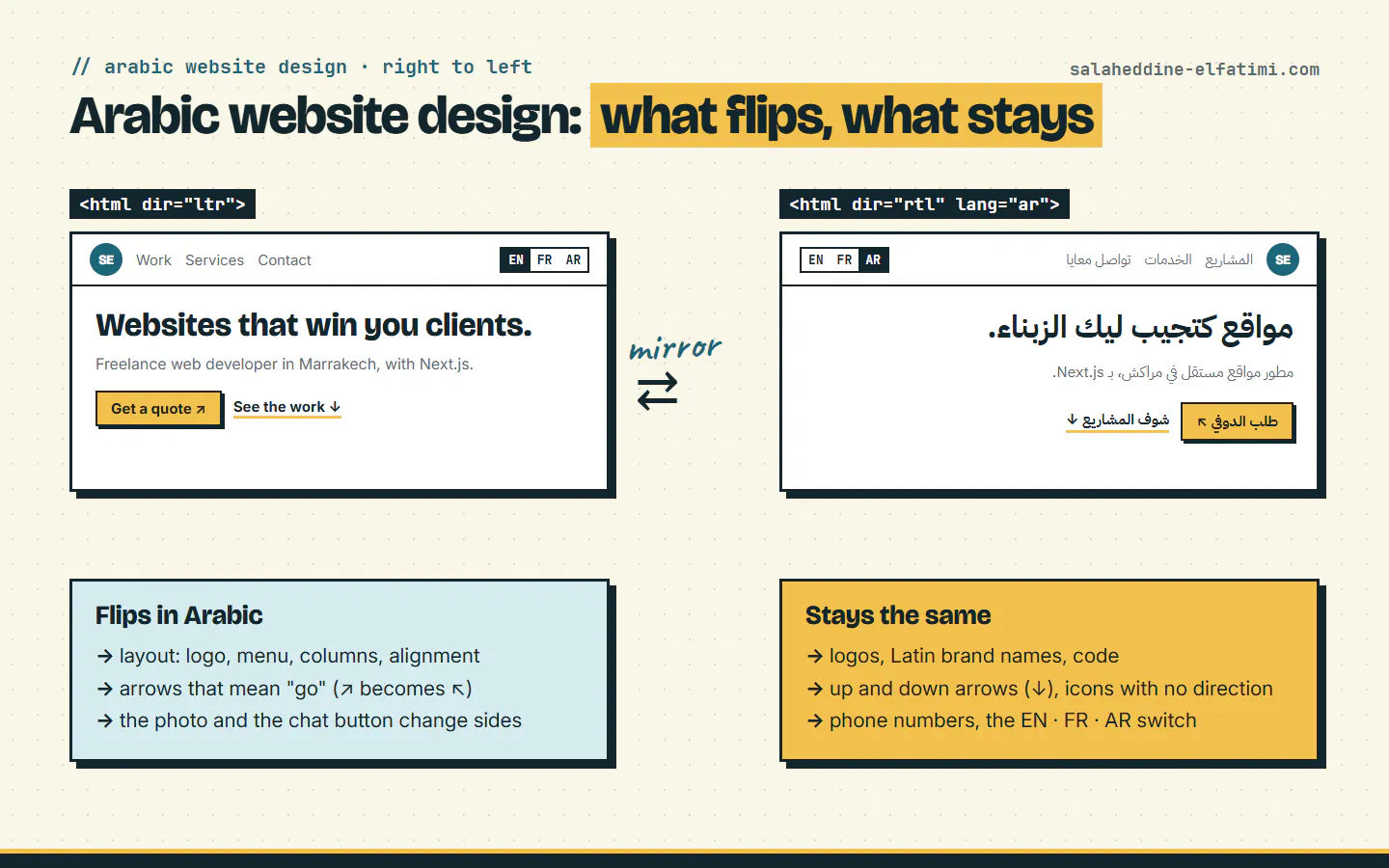
It starts with one line. The W3C's guide, Structural markup and right-to-left text in HTML, puts it simply: "If the overall document direction is right-to-left, add dir="rtl" to the html tag." My own Arabic home page starts with exactly that, lang="ar" dir="rtl", and so do the Arabic pages of Schoolaris and Polypro Academy.
Both attributes matter, for different reasons. The same W3C page warns: "do not make the mistake of assuming that language declarations indicate directionality, or vice versa!" lang says the text is Arabic; dir says which way it runs.
The second rule from that page is the one that saves the most work later: "Never use CSS to apply the base direction. But do use logical ('end' and 'start') on properties or values related to margins, padding, alignment, etc." Write "start" instead of "left" in your styles, and the Arabic layout mirrors itself. Write "left" everywhere, and someone fixes every page by hand.
Which icons and arrows flip, and which don't?#
In Arabic website design, not everything should mirror. The rule I follow: flip what points to a direction in the reading, keep what has a meaning of its own.
- Flip: arrows that mean "go" or "next". On this site, the arrow on "Get a quote" points up and to the right in English, and up and to the left in Arabic. In the code it's one class on the icon,
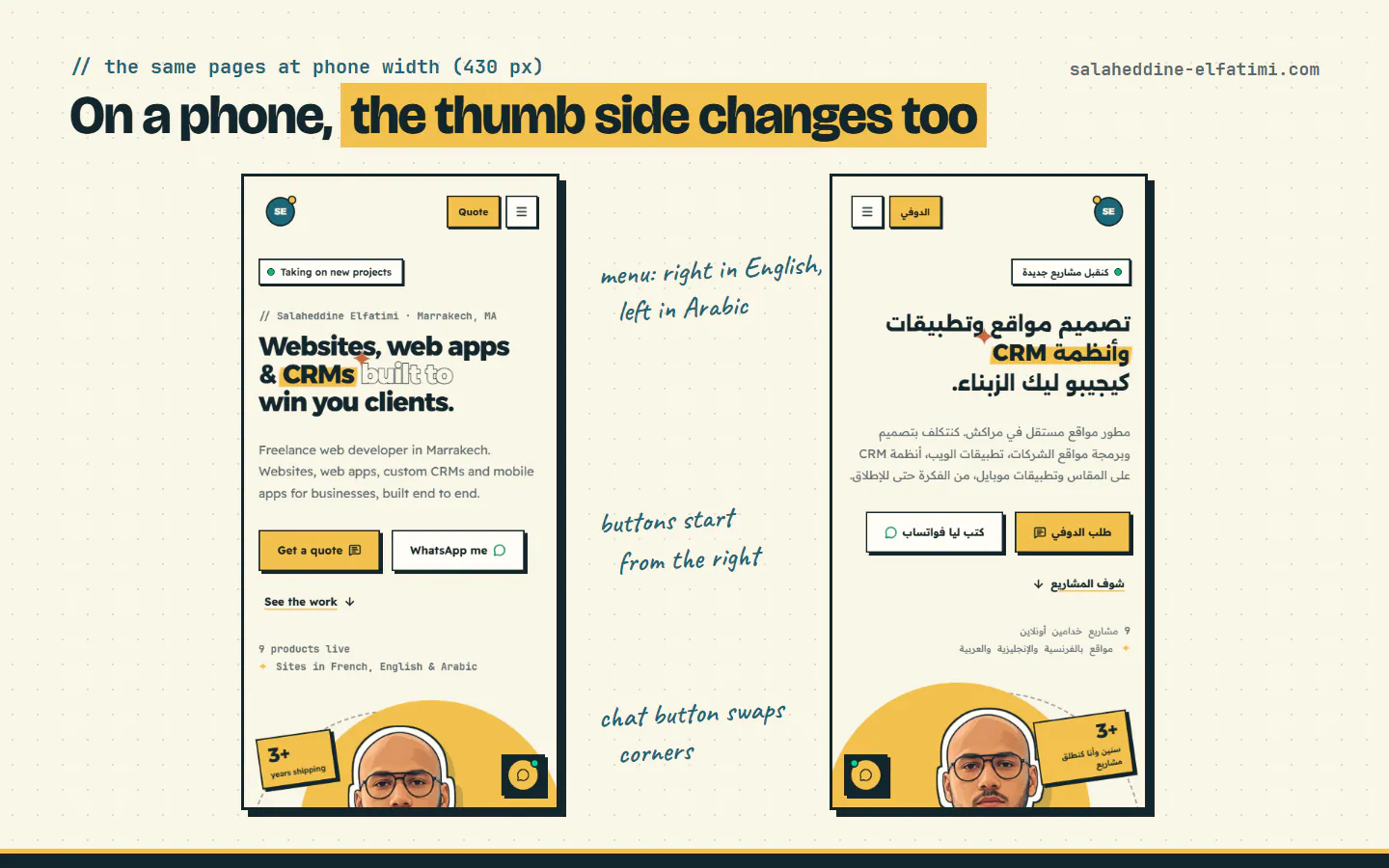
rtl:-scale-x-100, which mirrors it only on right-to-left pages. - Flip: the layout itself. The logo moves to the right, the photo and the chat button change sides, and on a phone the menu button moves from the right corner to the left.
- Keep: up and down arrows. "See the work ↓" points down in every language.
- Keep: logos, the WhatsApp icon, the copy icon, and anything with letters in it. A mirrored logo is someone else's logo.
- Keep: the EN · FR · AR switch, which stays left to right in Arabic (it has
dir="ltr"), so the three languages are always in the same order.
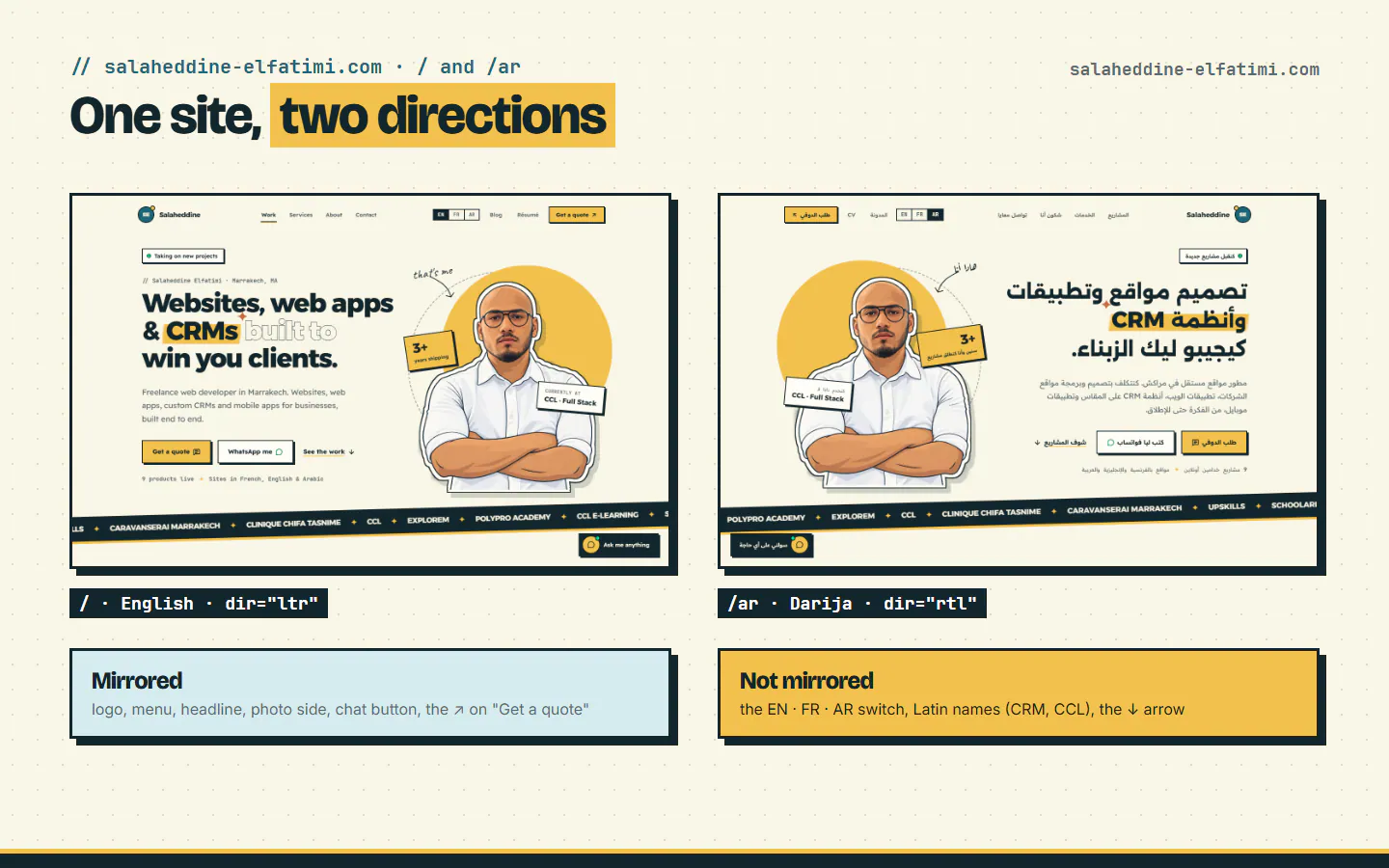
At phone width it's the same story, with one more detail: the menu button and the floating chat button move to the other side, where an Arabic reader's eyes start.
Which Arabic fonts, and why does line height change?#
Fonts are where Arabic website design shows at first glance. A Latin font doesn't draw Arabic letters, so the browser falls back to whatever the phone has, and your careful design gets a random Arabic font. Pick one on purpose. This site uses Readex Pro for text and Alexandria for headings, each with an Arabic file of its own; Polypro Academy loads Noto Sans Arabic.
Three things I learned while setting them up:
- Load the Arabic file only where it's needed. The Arabic files here are 23 to 46 KB each and aren't preloaded: the browser fetches them only on pages with Arabic text, so English visitors never download them.
- Arabic letters draw bigger at the same size. Measured against the Latin faces they replace, Alexandria's letters came out about 57% taller. The site scales them down so headings wrap where the design expects.
- Give the lines more room. Arabic has dots and marks above and below the letters, and tight lines make them touch. Blog text here is 18px with a line height of 1.8 in English, and 19px with 1.95 in Arabic. The big hero headline goes from 0.95 to 1.15.
And one rule that surprises designers: no letter-spacing on Arabic. Arabic letters join up, so the wide tracking that looks stylish on an English label pulls an Arabic word apart. The site's stylesheet resets it to normal on every Arabic element.
Why do prices and brand names come out backwards?#
Because the browser orders each piece of text by its direction, and this is the part of Arabic website design that catches everyone, me included. Arabic letters run right to left, Latin letters left to right, and digits, spaces and symbols like $, + or ~ take the direction of whatever is around them. Put a Latin brand name or a price inside an Arabic sentence, and the symbols can land on the wrong side.
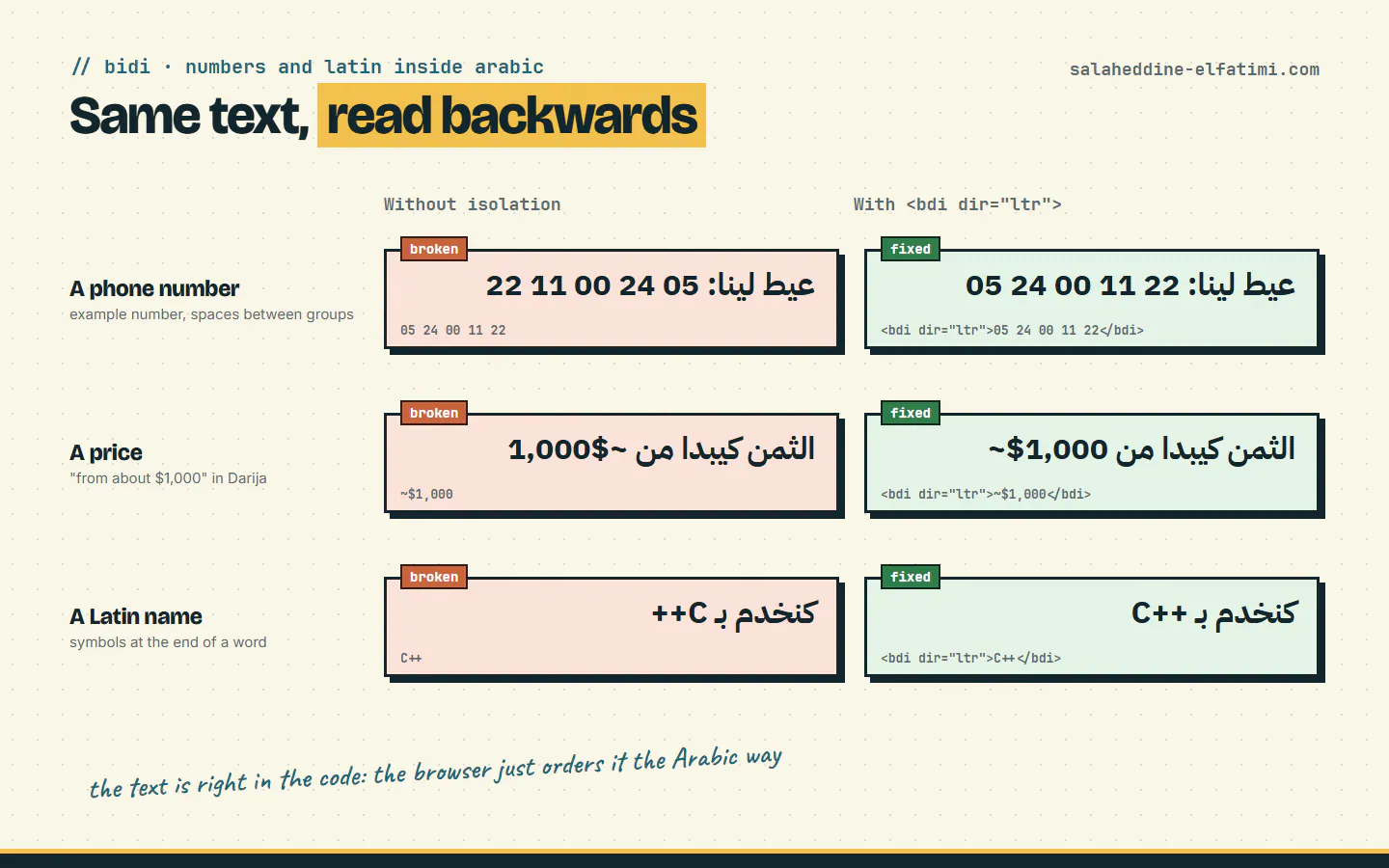
I learned this on my own Darija explainer videos before I wrote about it. On the cards, "1.5GB" showed as "GB1.5", "10+" as "+10", and a price with Arabic around it came out as "1000~ من$". The text was right in the script every time; only the order on screen was wrong.
The fix has a name: <bdi>. MDN describes it as the element that "tells the browser's bidirectional algorithm to treat the text it contains in isolation from its surrounding text." Wrap the price, the brand name or the number in it, and it keeps its own order:
<p dir="rtl" lang="ar">الثمن كيبدا من <bdi dir="ltr">~$1,000</bdi></p>On a design (a card, a banner, a video), there's a simpler fix: don't glue a Latin unit to a number inside Arabic. Write a full Arabic label with the number alone, or a full Latin label. And quotation marks: use straight quotes "…" in Arabic, never « », because the French-style ones flip in right-to-left text.
Western or Arabic-Indic digits?#
Arabic has two sets of digits: the Western ones (0 to 9) and the Arabic-Indic ones (٠ to ٩). On my Arabic pages, digits stay Western: it's a rule in the site's translation guide, and the dates use the locale ar-u-nu-latn, which asks for Arabic month names with Latin digits.
It's worth checking, because the browser decides for you otherwise. I ran the same number through JavaScript's built-in formatter (Node.js 25.9): with "ar-MA" it prints 1.500; with "ar-EG" or "ar-SA", it prints ١٬٥٠٠. Same code, different digits, depending on one locale tag. Choose it on purpose and write it down.
How should forms and phone numbers work in Arabic?#
A phone number is the classic trap. Inside Arabic text, a number written in groups like 05 24 00 11 22 shows its groups in reverse order, and a client calls a number that doesn't exist. On this site, the email, phone and LinkedIn in the contact section each sit in an element marked dir="ltr", so they read the same in every language.
Browsers help in one place: MDN's page on the dir attribute notes that "An <input type="tel"> element uses left-to-right direction." So a phone field typed as tel behaves even on an Arabic page. For fields where people may type either Arabic or Latin (a name, a message), the W3C recommends you "Set the dir attribute to auto on forms and inserted text in order to automatically detect the direction of content supplied at run-time."
- Phone and email fields:
type="tel"andtype="email", left to right. - Name and message fields:
dir="auto", so an Arabic name starts on the right and a French one on the left. - Labels, errors and the submit button in Arabic, aligned to the right.
Darija or Modern Standard Arabic for the copy?#
The last part of Arabic website design isn't code, it's the words. Both kinds of Arabic have a job. The Arabic version of this site is written in Darija, the Arabic Moroccans speak, because it reads like a person talking: "كنقبل مشاريع جديدة", "كتب ليا فواتساب". The résumé is the exception: a formal document, kept in standard Arabic.
But search is different. Moroccans search for web services in standard Arabic, not in Darija, and they type without hamzas: "انشاء موقع الكتروني", not "إنشاء موقع إلكتروني". In my keyword research, that phrase and "تصميم مواقع" are suggested by Google, Bing and DuckDuckGo. So the headings and titles hold the standard phrase, inside Darija sentences: the Arabic home page opens with "تصميم مواقع وتطبيقات", and its title is "مطور مواقع مستقل في مراكش".
Two smaller rules from the same guide: brand and tech names stay in Latin letters (Next.js, Schoolaris), and a loanword is used only when everyone says it and it reads easily in Arabic script. You can see a full Darija post in practice in my Arabic guide to e-learning platforms in Morocco.
My Arabic website design checklist before launch#
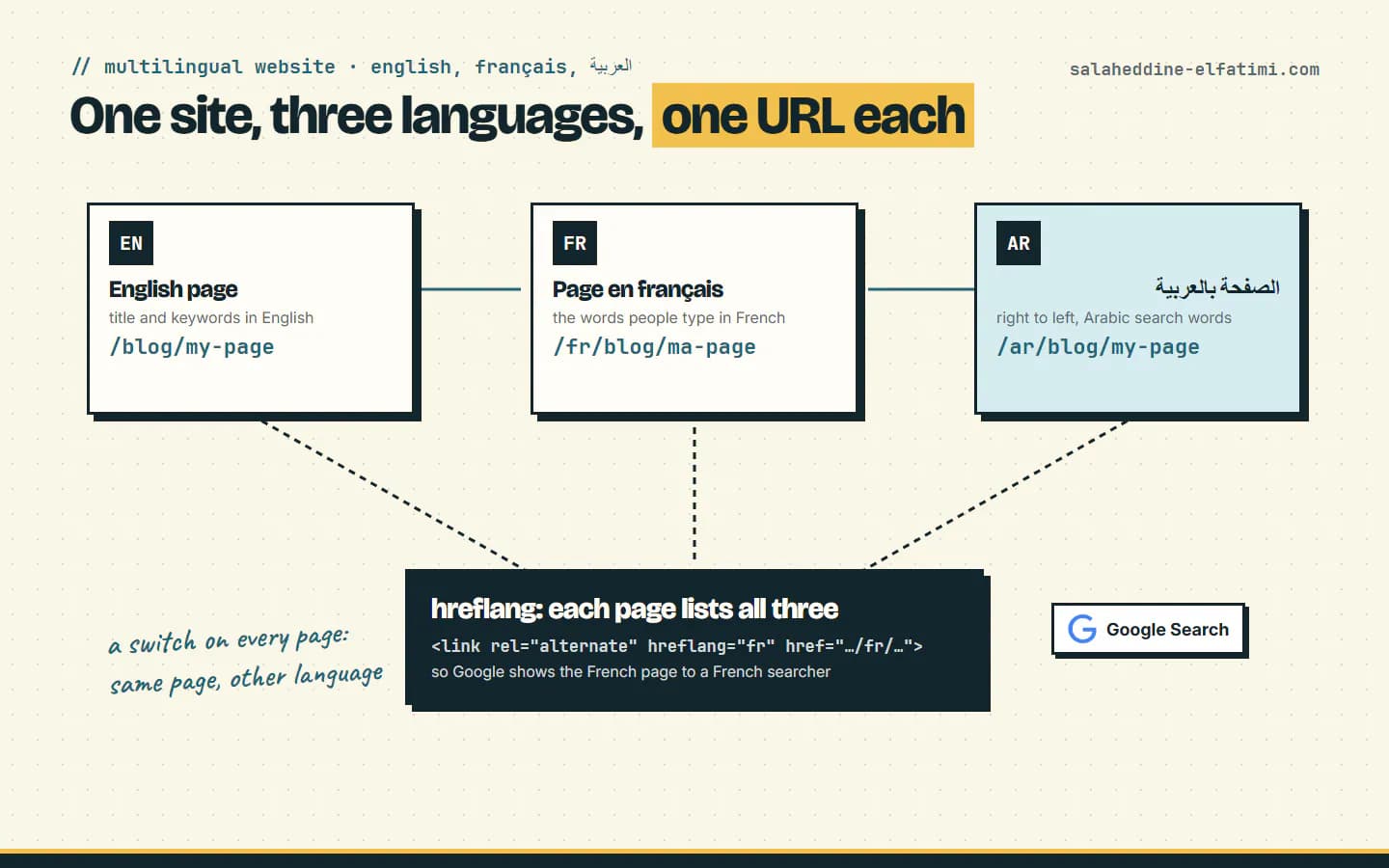
Most of the work is checking. The structure (URLs, hreflang, the language switch) is in my guide to multilingual websites; this is the design checklist:
lang="ar" dir="rtl"on the html tag, and logical properties (start, end) in the styles.- Every arrow looked at: does it mean "go" (flip it) or "down" (keep it)?
- An Arabic font chosen on purpose, with more line height and no letter-spacing.
- Every price, phone number, email and Latin name inside Arabic text checked on screen, wrapped in
<bdi>ordir="ltr"where needed. - One digit style, chosen and written down.
- Forms tried by typing Arabic and Latin into each field.
- Headings and titles that use the standard Arabic phrases people search, inside copy in your clients' Arabic.
- The pages read on a real phone, not just a wide screen.
Arabic is often the third language of a Moroccan site. Schoolaris works in French, Arabic and English, Polypro Academy in English, French and Arabic, and Explorem's website in English, Arabic and German. Each time, the Arabic website design is where small details show the most.
Planning an Arabic version of your website?#
Send me your site, or tell me what you want to build, and which languages your clients read. I'll tell you what the Arabic version needs and what it costs: ask for a quote here. You can also see how I build business websites in Arabic, French and English, or read how to hire a web developer in Morocco.
Frequently asked questions
What is the first step of Arabic website design?+
Set the direction on the whole document: lang="ar" dir="rtl" on the html tag, as the W3C recommends. Then use logical CSS properties (start and end) so the layout mirrors without rewriting each page.
Why does a price or phone number show backwards on an Arabic page?+
The browser orders each piece of text by its direction, and digits and symbols take the direction of the text around them. Wrap the price or number in a bdi element (or dir="ltr"), and it keeps its own order.
Should an Arabic website use Western or Arabic-Indic digits?+
Pick one and apply it everywhere. This site uses Western digits (0 to 9) on its Arabic pages, with the ar-u-nu-latn locale for dates, because the browser's default changes with the locale tag.
Should a Moroccan website be written in Darija or standard Arabic?+
Darija reads naturally for Moroccan clients, but people search for services in standard Arabic. Write the copy in Darija and keep the standard phrases people type, like "تصميم مواقع", in the headings and titles.

Written by
Full Stack Developer & Web Marketer · Marrakech, Morocco
I build modern, scalable web applications end to end, from frontend to backend, with a focus on performance, clean code and user experience.